Review what leaves
Bring together the source file, previewed pages, cover context, and complete destination before you send.
Explore sending →WHY FAXORYN
Faxoryn makes fax work legible from the first file to the final delivery state. The document, destination, owner, and result stay connected in one fax record.
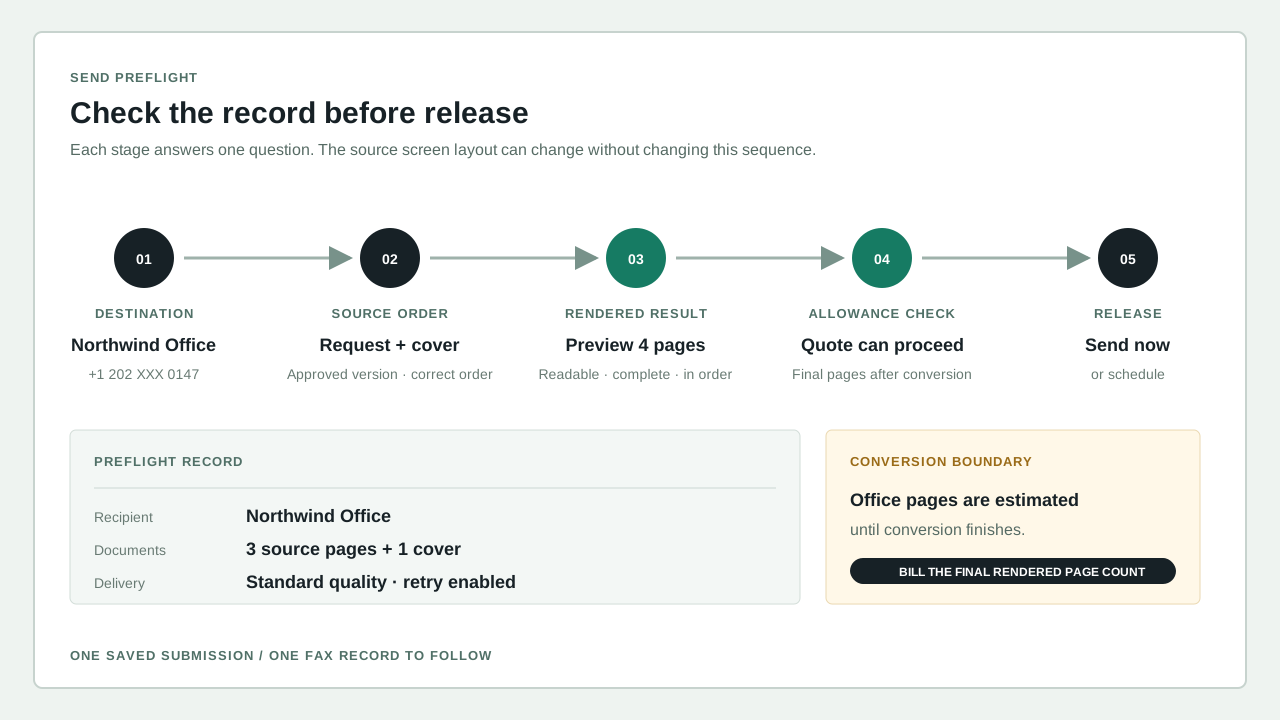
Recipients, source documents, cover context, and settings stay visible before you send. The preview is where you check page order, quality, the destination, and the account that will own the record.
NOT A FAX MACHINE IN A BROWSER
One place to prepare, route, prove, and follow up on document work.SCROLL TO SEE THE RECORDTHE DIFFERENCE IS THE RECORD
Bring together the source file, previewed pages, cover context, and complete destination before you send.
Explore sending →Follow each step instead of treating the send itself as proof the fax reached its destination. Waiting, sending, delivered, and failed are separate states, and each one changes what you should do next.
Understand delivery states →Keep the outcome attached to the number, account, responsible person, and original document for specific follow-up. A saved record also makes it easier to answer who handled the work, when it finished, and whether anything still needs attention.
Manage number ownership →A WORKSPACE WITH A POINT OF VIEW
Fax work rarely ends when the file leaves the screen. Faxoryn keeps the questions that follow within reach: Who owns this number? What did the recipient receive? Did it arrive? What should happen when it did not?
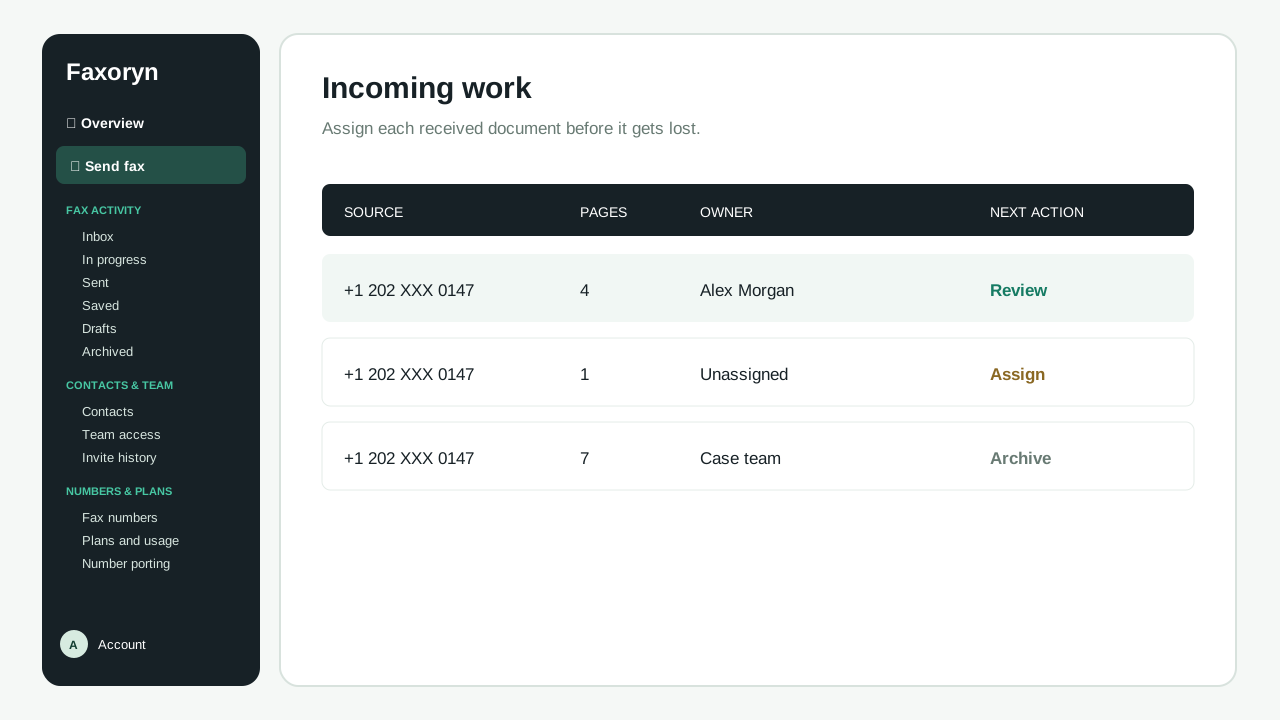
Received documents keep their source, owner, page count, and next action together, so anyone can see whether to assign, review, keep, or escalate each arrival.
CLEAR PRODUCT LIMITS
Status is explicit. Sending, delivery, and failure are shown as separate steps.
Ownership is named. People, numbers, and exceptions keep visible context.
Connections return to the record. Email, files, notifications, and API workflows all point back to the fax record in Faxoryn.
Claims stay verifiable. Pricing, security, and compliance statements come from what the service currently offers.
HOW WE COMPARE
Faxoryn is compared with the services teams most often evaluate. The pricing table compares the plan closest to Faxoryn's recommended Pro tier (about $20/mo). Capability marks show whether each service offers a feature on any published plan. Competitor prices and features were collected on 2026-10-05 from each official page; the Faxoryn column reflects its current live catalog.
| Feature | Faxoryn | eFax | HelloFax | Fax.Plus | MyFax |
|---|---|---|---|---|---|
| Free trial | |||||
| Free fax without a card | |||||
| Email to fax | |||||
| Web workspace | |||||
| Mobile app (iOS / Android) | |||||
| Desktop app (Mac / Windows) | |||||
| Slack integration | |||||
| Google Drive integration | |||||
| OneDrive integration | |||||
| API | |||||
| Two-factor authentication | |||||
| Team members | |||||
| Scheduled sending | |||||
| Block list | |||||
| Cover sheets | |||||
| Number porting | |||||
| Toll-free number | |||||
| Receive incoming faxes | |||||
| Retained fax records | |||||
| HIPAA + signed BAA |
| Pricing (plans near $20/mo) | Faxoryn | eFax | HelloFax | Fax.Plus | MyFax |
|---|---|---|---|---|---|
| Tier compared | |||||
| Pages included per month | 400 pages | 340 pages | 500 pages | 500 pages | 600 pages |
| Plan price per month | $20.00 | $18.99 | $19.99 | $13.99 | $25.00 |
| Custom (vanity) number fee | $0 | $0 | $19.99 | ||
| Setup fee | $0 | $0 | $0 | $0 | |
| Cost per additional page | $0.08 | $0.10 | $0.05 | $0.07 | $0.10 |
| Additional number per month | $5.00 | $5.00 | $4.99 |
Hover a competitor mark or its compared tier to see the source and collection date; the Faxoryn column uses the live catalog and needs no collection date. Every service also sells cheaper entry plans; this table compares the tier nearest $20/mo so prices are comparable, while capability marks show what each service offers across its published plans. Only confirmed values are shown, and prices and capabilities change — sources link to the official pages.
CHECK BEFORE YOU COMMIT
Use a document that reflects the ordinary page count, source format, cover requirements, and document order your team expects to send. Review the previewed pages before you send rather than assuming the source file will look the same.
Check the complete fax number, intended recipient, number type, country rules where relevant, and the person who can confirm the result. A correctly formatted number is not a substitute for confirming the recipient and purpose.
Check how the workspace handles invalid destinations, file problems, waiting work, delivery failure, and retries. Keep the record number visible so you can tell a retry apart from an accidental duplicate.
Review the plan, selected number, page allowance, renewal, receiving eligibility, how long records are kept, and the support path. Product screens describe the workflow; your live account terms determine what you can actually use.
WORKING QUESTIONS
These are the questions a team should answer while evaluating an online fax workflow. The answers depend on your documents, destinations, owners, and how your team works.
For supported document workflows, the browser becomes the place to prepare files, review destinations, send a fax, inspect what was received, and follow the final status. Your business still decides who may use a number, who confirms a recipient, and how sensitive documents are handled after delivery.
Sending only proves that Faxoryn accepted the request. Check the fax record for the final delivered or failed status, together with its destination, timestamps, and any confirmation you need from the recipient.
Pick one real document and follow it through preparation, number selection, member access, the final status, what happens when a send fails, and the support route. Expand only after the team agrees on who is responsible and what proves the task is done.
No. Legal, privacy, retention, security, and contractual requirements depend on your company, the documents, the jurisdictions involved, and how you use the service. Confirm the required evidence and agreements before using a regulated workflow.
SEE THE WORKFLOW WITH YOUR OWN DOCUMENT